# Quick Start

### Overview

Before you begin the character creation process, please familiarize yourself with the [House Rules](https://redhandchronicles.com/books/house-rules-bad) that apply to the Baltimore After Dark chronicle. Note that to play a character above Neonate, you must be pre-approved by Staff; please request a discussion through the ***\#ask-staff*** channel on the Discord Server.

### Step 1 • Character Concept

Start with a basic concept for your character. Think of one or two words to describe this concept and don't be shy about discussing your ideas with staff and other players.

When you are ready, create your character sheet by selecting the New Character option from your user menu:

![newCharacter.jpg](https://redhandchronicles.com/uploads/images/gallery/2022-05/scaled-1680-/PWUH2ZC9RnnUUBlA-newcharacter.jpg)

You will be redirected to your new character sheet. The first thing you should do is change the title of this character sheet to the name of your character in the format `Firstname Lastname` :

![Settitle.jpg](https://redhandchronicles.com/uploads/images/gallery/2022-05/scaled-1680-/QdaoP9pGanTlQp3c-settitle.jpg)

<p class="callout warning">Make sure to save your character sheet often to avoid losing your work! You can save your sheet using the Save Page link.</p>

### Step 2 • Overview &amp; The Basics

The first section of the character sheet is the **Overview**. In this section you will upload your character's portrait and provide a brief synopsis about your character. This overview does not need to be long but should provide other players with a general idea about who your character is, why they are in Baltimore and any other important information that might be relevant.

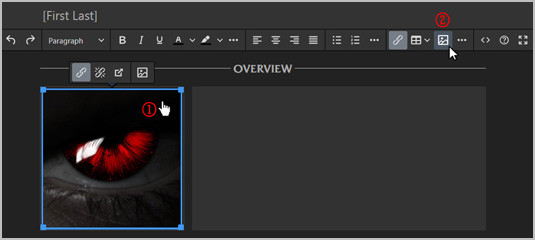
Your character's portrait should be 250px wide by 250px tall. The JPG format is preferred. To upload your character's portrait, select the image on the character sheet (1) then click the image icon on the toolbar (2):
![portrait-part1.jpg](https://redhandchronicles.com/uploads/images/gallery/2022-05/scaled-1680-/nMdIJquZsKoJJJZv-portrait-part1.jpg)

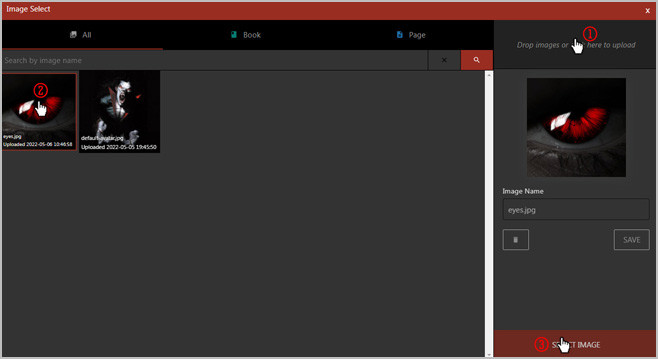
This will launch the image manager. From here drag an image into the upload section or simply click on it (1) to launch the file picker. When your image is uploaded, select it from the gallery (2) and then click on select image (3):
![portrait-part2.jpg](https://redhandchronicles.com/uploads/images/gallery/2022-05/scaled-1680-/mqO8YqZGNrK3Bzyy-portrait-part2.jpg)

The second section - The Basics - contains some general information about your character. Complete each section as follows:

<table border="1" id="bkmrk-name-your-characters" style="border-collapse: collapse; width: 100%;"><tbody><tr><td style="width: 13.1479%;">**Name**  
</td><td style="width: 86.8514%;"><span style="font-family: -apple-system, BlinkMacSystemFont, 'Segoe UI', Oxygen, Ubuntu, Roboto, Cantarell, 'Fira Sans', 'Droid Sans', 'Helvetica Neue', sans-serif; font-size: 14px; font-style: normal; font-variant-ligatures: normal; font-variant-caps: normal; font-weight: 400;">Your characters name (generally Firstname Lastname)</span>  
</td></tr><tr><td style="width: 13.1479%;">**Player**  
</td><td style="width: 86.8514%;"><span style="font-family: -apple-system, BlinkMacSystemFont, 'Segoe UI', Oxygen, Ubuntu, Roboto, Cantarell, 'Fira Sans', 'Droid Sans', 'Helvetica Neue', sans-serif; font-size: 14px; font-style: normal; font-variant-ligatures: normal; font-variant-caps: normal; font-weight: 400;">Your Discord nickname used on the RHC Server</span>  
</td></tr><tr><td style="width: 13.1479%;">**Chronicle**  
</td><td style="width: 86.8514%;"><span style="font-family: -apple-system, BlinkMacSystemFont, 'Segoe UI', Oxygen, Ubuntu, Roboto, Cantarell, 'Fira Sans', 'Droid Sans', 'Helvetica Neue', sans-serif; font-size: 14px; font-style: normal; font-variant-ligatures: normal; font-variant-caps: normal; font-weight: 400;">Baltimore After Dark</span>  
</td></tr><tr><td style="width: 13.1479%;">**Nature**  
</td><td style="width: 86.8514%;"><span style="font-family: -apple-system, BlinkMacSystemFont, 'Segoe UI', Oxygen, Ubuntu, Roboto, Cantarell, 'Fira Sans', 'Droid Sans', 'Helvetica Neue', sans-serif; font-size: 14px; font-style: normal; font-variant-ligatures: normal; font-variant-caps: normal; font-weight: 400;">Your character's 'true' personality.</span>  
</td></tr><tr><td style="width: 13.1479%;">**Demeanor**  
</td><td style="width: 86.8514%;"><span style="font-family: -apple-system, BlinkMacSystemFont, 'Segoe UI', Oxygen, Ubuntu, Roboto, Cantarell, 'Fira Sans', 'Droid Sans', 'Helvetica Neue', sans-serif; font-size: 14px; font-style: normal; font-variant-ligatures: normal; font-variant-caps: normal; font-weight: 400;">How your character presents themselves.</span>  
</td></tr><tr><td style="width: 13.1479%;">**Concept**  
</td><td style="width: 86.8514%;"><span style="font-family: -apple-system, BlinkMacSystemFont, 'Segoe UI', Oxygen, Ubuntu, Roboto, Cantarell, 'Fira Sans', 'Droid Sans', 'Helvetica Neue', sans-serif; font-size: 14px; font-style: normal; font-variant-ligatures: normal; font-variant-caps: normal; font-weight: 400;">Remember that one or two word concept you thought of earlier? Put that here!</span>  
</td></tr><tr><td style="width: 13.1479%;">**Clan**  
</td><td style="width: 86.8514%;"><span style="font-family: -apple-system, BlinkMacSystemFont, 'Segoe UI', Oxygen, Ubuntu, Roboto, Cantarell, 'Fira Sans', 'Droid Sans', 'Helvetica Neue', sans-serif; font-size: 14px; font-style: normal; font-variant-ligatures: normal; font-variant-caps: normal; font-weight: 400;">Your character's clan.</span>  
</td></tr><tr><td style="width: 13.1479%;">**Generation**  
</td><td style="width: 86.8514%;"><span style="font-family: -apple-system, BlinkMacSystemFont, 'Segoe UI', Oxygen, Ubuntu, Roboto, Cantarell, 'Fira Sans', 'Droid Sans', 'Helvetica Neue', sans-serif; font-size: 14px; font-style: normal; font-variant-ligatures: normal; font-variant-caps: normal; font-weight: 400;">Starts at 13th. Can be lowered through the Generation background, or raised through Flaws.</span>  
</td></tr><tr><td style="width: 13.1479%;">**Sire**  
</td><td style="width: 86.8514%;"><span style="font-family: -apple-system, BlinkMacSystemFont, 'Segoe UI', Oxygen, Ubuntu, Roboto, Cantarell, 'Fira Sans', 'Droid Sans', 'Helvetica Neue', sans-serif; font-size: 14px; font-style: normal; font-variant-ligatures: normal; font-variant-caps: normal; font-weight: 400;">The name of your character's sire (if known).</span></td></tr></tbody></table>

<p class="callout info">When entering text into longer text areas, use CTRL-ENTER to enter a new line.</p>

### Step 3 • Attributes

Attributes are divided into three (3) categories: Physical, Social and Mental. During this step, prioritize your attribute categories as Primary, Secondary and Tertiary; record this choice by marking each category on your sheet with a P, S, or T. Your character begins with one (1) dot in each attribute.

Assign dots to each of your attribute categories according to the following chart:

<table border="1" class="align-left" id="bkmrk-kindred-tier-primary" style="border-collapse: collapse; width: 100%;"><thead><tr><th class="align-left" style="width: 12.9789%;">Kindred Tier</th><th class="align-left" style="width: 11.124%;">Primary</th><th class="align-left" style="width: 11.62%;">Secondary</th><th class="align-left" style="width: 11.6192%;">Tertiary</th><th class="align-left" style="width: 52.5336%;">Notes</th></tr></thead><tbody><tr><td style="width: 12.9789%;">Fledgeling</td><td style="width: 11.124%;">7 dots</td><td style="width: 11.62%;">5 dots</td><td style="width: 11.6192%;">3 dots</td><td style="width: 52.5336%;">  
</td></tr><tr><td style="width: 12.9789%;">Neonate</td><td style="width: 11.124%;">7 dots</td><td style="width: 11.62%;">5 dots</td><td style="width: 11.6192%;">3 dots</td><td style="width: 52.5336%;">  
</td></tr><tr><td style="width: 12.9789%;">Ancilla</td><td style="width: 11.124%;">8 dots</td><td style="width: 11.62%;">6 dots</td><td style="width: 11.6192%;">4 dots</td><td style="width: 52.5336%;">  
</td></tr><tr><td style="width: 12.9789%;">Elder</td><td style="width: 11.124%;">9 dots</td><td style="width: 11.62%;">7 dots</td><td style="width: 11.6192%;">5 dots</td><td style="width: 52.5336%;">  
</td></tr></tbody></table>

<p class="callout info">You can modify the dots on your sheets by using '1' for a filled in dot and '0' for an empty dot.   
For example to set an attribute to 3 or <span class="dots">11100</span> you would enter '11100'.</p>

<p class="callout warning">No Attribute may exceed 5.</p>

### Step 4 • Abilities

Abilities are divided into three (3) categories: Talents, Skills and Knowledge. During this step, prioritize your attribute categories as Primary, Secondary and Tertiary; record this choice by marking each category on your sheet with a P, S, or T. Your character begins with zero (0) dots in each attribute.

Assign dots to each of your ability categories according to the following chart:

<table border="1" class="align-left" id="bkmrk-kindred-tier-primary-0" style="border-collapse: collapse; width: 100%;"><thead><tr><th class="align-left" style="width: 12.9789%;">Kindred Tier</th><th class="align-left" style="width: 11.124%;">Primary</th><th class="align-left" style="width: 11.62%;">Secondary</th><th class="align-left" style="width: 11.6192%;">Tertiary</th><th class="align-left" style="width: 52.5336%;">Notes</th></tr></thead><tbody><tr><td style="width: 12.9789%;">Fledgeling</td><td style="width: 11.124%;">13 dots</td><td style="width: 11.62%;">9 dots</td><td style="width: 11.6192%;">5 dots</td><td style="width: 52.5336%;">  
</td></tr><tr><td style="width: 12.9789%;">Neonate</td><td style="width: 11.124%;">13 dots</td><td style="width: 11.62%;">9 dots</td><td style="width: 11.6192%;">5 dots</td><td style="width: 52.5336%;">  
</td></tr><tr><td style="width: 12.9789%;">Ancilla</td><td style="width: 11.124%;">14 dots</td><td style="width: 11.62%;">10 dots</td><td style="width: 11.6192%;">6 dots</td><td style="width: 52.5336%;">  
</td></tr><tr><td style="width: 12.9789%;">Elder</td><td style="width: 11.124%;">15 dots</td><td style="width: 11.62%;">11 dots</td><td style="width: 11.6192%;">7 dots</td><td style="width: 52.5336%;">  
</td></tr></tbody></table>

<p class="callout info">You can modify the dots on your sheets by using '1' for a filled in dot and '0' for an empty dot.   
For example to set an attribute to 3 or <span class="dots">11100</span> you would enter '11100'.</p>

<p class="callout warning">No single Ability may go above three dots at this time. During the Freebies and Experience phase, abilities may be raised up to the Generation maximum.</p>

### Step 5 • Advantages

##### Clan Disciplines

Record and assign dots to Clan Disciplines according to the chart below. Clan Disciplines should me marks with an \* on your sheet. You can assign these dots in any combination (1 dot in three Clan Disciplines, 3 dots in one Clan Discipline, etc.).

<table border="1" class="align-left" id="bkmrk-kindred-tier-dots-no" style="border-collapse: collapse; width: 100%;"><thead><tr><th class="align-left" style="width: 13.3497%;">Kindred Tier</th><th class="align-left" style="width: 10.5592%;">Dots</th><th class="align-left" style="width: 75.9667%;">Notes</th></tr></thead><tbody><tr><td style="width: 13.3497%;">Fledgling</td><td style="width: 10.5592%;">3</td><td style="width: 75.9667%;">  
</td></tr><tr><td style="width: 13.3497%;">Neonate</td><td style="width: 10.5592%;">3</td><td style="width: 75.9667%;">  
</td></tr><tr><td style="width: 13.3497%;">Ancilla</td><td style="width: 10.5592%;">4</td><td style="width: 75.9667%;">  
</td></tr><tr><td style="width: 13.3497%;">Elder</td><td style="width: 10.5592%;">5</td><td style="width: 75.9667%;">  
</td></tr></tbody></table>

##### Backgrounds

Record and assign dots to backgrounds according to the following chart:

<table border="1" class="align-left" id="bkmrk-kindred-tier-dots-no-0" style="border-collapse: collapse; width: 100%;"><thead><tr><th class="align-left" style="width: 13.3497%;">Kindred Tier</th><th class="align-left" style="width: 10.5592%;">Dots</th><th class="align-left" style="width: 75.9667%;">Notes</th></tr></thead><tbody><tr><td style="width: 13.3497%;">Fledgling</td><td style="width: 10.5592%;">6</td><td style="width: 75.9667%;">  
</td></tr><tr><td style="width: 13.3497%;">Neonate</td><td style="width: 10.5592%;">6</td><td style="width: 75.9667%;">  
</td></tr><tr><td style="width: 13.3497%;">Ancilla</td><td style="width: 10.5592%;">7</td><td style="width: 75.9667%;">  
</td></tr><tr><td style="width: 13.3497%;">Elder</td><td style="width: 10.5592%;">8</td><td style="width: 75.9667%;">  
</td></tr></tbody></table>

<p class="callout warning">You must purchase the Generation background for any character less than 13th generation.</p>

For Backgrounds that require additional information (e.g. Allies, Contacts, etc.) please be sure to fill out the Expanded Background section.

##### Virtues

For characters on the Path of Humanity:

The Path of Humanity has three Virtues: Conscience, Self-Control, and Courage. Edit your sheet to reflect this (e.g. delete Instinct and Conviction). The three Virtues begin with one free dot each. Assign 7 dots among these Virtues ensuring that no Virtue exceeds 5 dots.

For characters on a Path other than Humanity:

Your chosen Path may use Conviction instead of Conscience or Instinct instead of Self-Control. Edit your sheet to reflect the names of your Path's Virtues (e.g. if it using Instinct, delete Self-Control). Conscience, Self-Control, and Courage begin with one free dot each, but Conviction and Instinct start at zero dots. Assign 7 dots among your Path's three Virtues ensuring that no Virtue exceeds 5 dots.

##### Humanity/Path

If your character is on a Path other than Humanity, record the Path name in the Path field along with the Path's Bearing.

Record your Humanity or Path score which is equal to `Conscience/Conviction + Self-Control/Instinct`.

<p class="callout info">You can modify the dots on your sheets by using '1' for a filled in dot and '0' for an empty dot.   
For example to set your Humanity to 6 or <span class="dots">1</span><span class="dots">1</span><span class="dots">1</span><span class="dots">1</span><span class="dots">1 10000</span> you would enter '11111 10000'.</p>

##### Willpower

Record your permanent Willpower (circular dots) which is equal to `Courage`.

<p class="callout info">You can modify the dots on your sheets by using '1' for a filled in dot and '0' for an empty dot.   
For example to set your permanent Willpower to 6 or <span class="dots">1</span><span class="dots">1</span><span class="dots">1</span><span class="dots">1</span><span class="dots">1 10000</span> you would enter '11111 10000'.</p>

##### Blood Pool

Record your starting Blood Pool and Blood Per Turn according to the Generational maximums:

<table border="1" class="align-left" id="bkmrk-generation-maximum-b" style="border-collapse: collapse; width: 100%;"><thead><tr><th class="align-left" style="width: 11.4956%;">Generation</th><th class="align-left" style="width: 19.1593%;">Maximum Blood Pool</th><th class="align-left" style="width: 15.202%;">Blood Per Turn</th><th class="align-left" style="width: 54.1424%;">Notes</th></tr></thead><tbody><tr><td style="width: 11.4956%;">7th</td><td style="width: 19.1593%;">20</td><td style="width: 15.202%;">4</td><td style="width: 54.1424%;">  
</td></tr><tr><td style="width: 11.4956%;">8th</td><td style="width: 19.1593%;">15</td><td style="width: 15.202%;">3</td><td style="width: 54.1424%;">  
</td></tr><tr><td style="width: 11.4956%;">9th</td><td style="width: 19.1593%;">14</td><td style="width: 15.202%;">2</td><td style="width: 54.1424%;">  
</td></tr><tr><td style="width: 11.4956%;">10th</td><td style="width: 19.1593%;">13</td><td style="width: 15.202%;">1</td><td style="width: 54.1424%;">  
</td></tr><tr><td style="width: 11.4956%;">11th</td><td style="width: 19.1593%;">12</td><td style="width: 15.202%;">1</td><td style="width: 54.1424%;">  
</td></tr><tr><td style="width: 11.4956%;">12th</td><td style="width: 19.1593%;">11</td><td style="width: 15.202%;">1</td><td style="width: 54.1424%;">  
</td></tr><tr><td style="width: 11.4956%;">13th</td><td style="width: 19.1593%;">10</td><td style="width: 15.202%;">1</td><td style="width: 54.1424%;">  
</td></tr><tr><td style="width: 11.4956%;">14th</td><td style="width: 19.1593%;">10</td><td style="width: 15.202%;">1</td><td style="width: 54.1424%;">See the [Flaw: Fourteenth Generation](https://redhandchronicles.com/link/26#bkmrk-fourteenth-generatio)</td></tr><tr><td style="width: 11.4956%;">15th</td><td style="width: 19.1593%;">10</td><td style="width: 15.202%;">1</td><td style="width: 54.1424%;">See the [Flaw: Fifteenth Generation](https://redhandchronicles.com/link/26#bkmrk-fifteenth-generation)</td></tr></tbody></table>

### Step 6 • Merits &amp; Flaws

You may optionally select [Merits](https://redhandchronicles.com/books/character-creation/chapter/merits) and/or [Flaws ](https://redhandchronicles.com/books/character-creation/chapter/flaws)for your character.

You may purchase Merits using Freebie Points (Step 7).

Flaws may be taken to receive Bonus Freebie Points, but you cannot receive more than 7 Freebie Points from Flaws.

### Step 7 • Freebie Points

You may now spend 15 Freebie Points (less any Merits taken) plus any Bonus Freebie Points received by taking Flaws up to a maximum of 22 Freebie Points. Make note of how you spend your Freebie Points in the Experience section of the character sheet.

Be sure to adjust any traits affected by your Freebie purchases.

Freebie points can be spent according to the following chart:

<table border="1" class="align-left" id="bkmrk-category-cost-notes-" style="border-collapse: collapse; width: 100%; height: 238.295px;"><thead><tr style="height: 29.7869px;"><th class="align-left" style="width: 14.4622%; height: 29.7869px;">Category</th><th class="align-left" style="width: 11.04%; height: 29.7869px;">Cost</th><th class="align-left" style="width: 74.2499%; height: 29.7869px;">Notes</th></tr></thead><tbody><tr style="height: 29.7869px;"><td style="width: 14.4622%; height: 29.7869px;">Ability</td><td style="width: 11.04%; height: 29.7869px;">2 per dot</td><td style="width: 74.2499%; height: 29.7869px;">  
</td></tr><tr style="height: 29.7869px;"><td style="width: 14.4622%; height: 29.7869px;">Attribute</td><td style="width: 11.04%; height: 29.7869px;">5 per dot</td><td style="width: 74.2499%; height: 29.7869px;">  
</td></tr><tr style="height: 29.7869px;"><td style="width: 14.4622%; height: 29.7869px;">Background</td><td style="width: 11.04%; height: 29.7869px;">1 per dot</td><td style="width: 74.2499%; height: 29.7869px;">  
</td></tr><tr style="height: 29.7869px;"><td style="width: 14.4622%; height: 29.7869px;">Discipline</td><td style="width: 11.04%; height: 29.7869px;">7 per dot</td><td style="width: 74.2499%; height: 29.7869px;">  
</td></tr><tr style="height: 29.7869px;"><td style="width: 14.4622%; height: 29.7869px;">Humanity</td><td style="width: 11.04%; height: 29.7869px;">2 per dot</td><td style="width: 74.2499%; height: 29.7869px;">  
</td></tr><tr><td style="width: 14.4622%;">Specialty</td><td style="width: 11.04%;">1 dot</td><td style="width: 74.2499%;">Maximum 3 per Attribute or Ability</td></tr><tr style="height: 29.7869px;"><td style="width: 14.4622%; height: 29.7869px;">Virtue</td><td style="width: 11.04%; height: 29.7869px;">2 per dot</td><td style="width: 74.2499%; height: 29.7869px;">  
</td></tr><tr style="height: 29.7869px;"><td style="width: 14.4622%; height: 29.7869px;">Willpower</td><td style="width: 11.04%; height: 29.7869px;">1 per dot</td><td style="width: 74.2499%; height: 29.7869px;">  
</td></tr></tbody></table>

<p class="callout danger">Any points not spent at this time are lost.</p>

### Step 8 • Specialties

For each Attribute or Ability above 3, you may select a Specialty for it. Record this specialty next to the Attribute or Ability:

![specialty.jpg](https://redhandchronicles.com/uploads/images/gallery/2022-05/scaled-1680-/cKmwSpK6tGIdfIa4-specialty.jpg)

### Step 9 • Experience Points

You may now spend Starting Experience Points. Record your total Starting Experience Points on your character sheet according to your Kindred Tier:

<table border="1" class="align-left" id="bkmrk-kindred-tier-age---t" style="border-collapse: collapse; width: 100%;"><thead><tr><th class="align-left" style="width: 12.9789%;">Kindred Tier</th><th style="width: 18.6649%;">Age - Torpor Period</th><th class="align-left" style="width: 8.15816%;">XP</th><th class="align-left" style="width: 60.0737%;">Notes</th></tr></thead><tbody><tr><td rowspan="2" style="width: 12.9789%;">Fledgling / Neonate  
</td><td style="width: 18.6649%;">1-50</td><td style="width: 8.15816%;">15</td><td style="width: 60.0737%;">  
</td></tr><tr><td style="width: 18.6649%;">50-100</td><td style="width: 8.15816%;">35</td><td style="width: 60.0737%;">  
</td></tr><tr><td rowspan="4" style="width: 12.9789%;">Ancilla  
</td><td style="width: 18.6649%;">101-150</td><td style="width: 8.15816%;">75</td><td style="width: 60.0737%;">  
</td></tr><tr><td style="width: 18.6649%;">151-200</td><td style="width: 8.15816%;">110</td><td style="width: 60.0737%;">  
</td></tr><tr><td style="width: 18.6649%;">201-250</td><td style="width: 8.15816%;">160</td><td style="width: 60.0737%;">  
</td></tr><tr><td style="width: 18.6649%;">251-299</td><td style="width: 8.15816%;">-</td><td style="width: 60.0737%;">To be determined in discussion with staff.</td></tr><tr><td style="width: 12.9789%;">Elder</td><td style="width: 18.6649%;">300+</td><td style="width: 8.15816%;">-</td><td style="width: 60.0737%;">To be determined in discussion with staff.</td></tr></tbody></table>

Make note of how you spend your Experience Points in the Experience section of the character sheet.

Experience Points can be spent according to the following chart:

<table border="1" class="align-left" id="bkmrk-category-cost-notes--0" style="border-collapse: collapse; width: 100%; height: 337.656px;"><thead><tr style="height: 29.7869px;"><th class="align-left" style="width: 18.2928%; height: 29.7869px;">Category</th><th class="align-left" style="width: 22.3744%; height: 29.7869px;">Cost</th><th class="align-left" style="width: 59.2085%; height: 29.7869px;">Notes</th></tr></thead><tbody><tr style="height: 29.7869px;"><td style="width: 18.2928%; height: 29.7869px;">New Ability</td><td style="width: 22.3744%; height: 29.7869px;">3</td><td style="width: 59.2085%; height: 29.7869px;">  
</td></tr><tr><td style="width: 18.2928%;">New Background</td><td style="width: 22.3744%;">3</td><td style="width: 59.2085%;">  
</td></tr><tr style="height: 29.7869px;"><td style="width: 18.2928%; height: 29.7869px;">New Discipline</td><td style="width: 22.3744%; height: 29.7869px;">10</td><td style="width: 59.2085%; height: 29.7869px;">  
</td></tr><tr style="height: 29.7869px;"><td style="width: 18.2928%; height: 29.7869px;">New Path</td><td style="width: 22.3744%; height: 29.7869px;">7</td><td style="width: 59.2085%; height: 29.7869px;">Necromancy or Thaumaturgy</td></tr><tr><td style="width: 18.2928%;"><span style="font-family: -apple-system, BlinkMacSystemFont, 'Segoe UI', Oxygen, Ubuntu, Roboto, Cantarell, 'Fira Sans', 'Droid Sans', 'Helvetica Neue', sans-serif; font-size: 14px; font-style: normal; font-variant-ligatures: normal; font-variant-caps: normal; font-weight: 400;">New Specialty</span>  
</td><td style="width: 22.3744%;">3</td><td style="width: 59.2085%;"><span style="font-family: -apple-system, BlinkMacSystemFont, 'Segoe UI', Oxygen, Ubuntu, Roboto, Cantarell, 'Fira Sans', 'Droid Sans', 'Helvetica Neue', sans-serif; font-size: 14px; font-style: normal; font-variant-ligatures: normal; font-variant-caps: normal; font-weight: 400;">1 Free Specialty with an Attribute or Ability at 4+; Maximum 3 per Attribute or Ability</span>  
</td></tr><tr style="height: 29.7869px;"><td style="width: 18.2928%; height: 29.7869px;">Attribute</td><td style="width: 22.3744%; height: 29.7869px;">Current Rating × 4</td><td style="width: 59.2085%; height: 29.7869px;">  
</td></tr><tr style="height: 10px;"><td style="width: 18.2928%; height: 10px;">Ability</td><td style="width: 22.3744%; height: 10px;">Current Rating × 2</td><td style="width: 59.2085%; height: 10px;">  
</td></tr><tr><td style="width: 18.2928%;">Background</td><td style="width: 22.3744%;">Current Rating × 2</td><td style="width: 59.2085%;">  
</td></tr><tr style="height: 29.7869px;"><td style="width: 18.2928%; height: 29.7869px;">Clan Discipline</td><td style="width: 22.3744%; height: 29.7869px;">Current Rating × 5</td><td rowspan="2" style="height: 59.5738px; width: 59.2085%;">Caitiff have no Clan Disciplines. The cost for a Caitiff to raise all Disciplines is the Current Rating × 6.  
</td></tr><tr style="height: 29.7869px;"><td style="width: 18.2928%; height: 29.7869px;">Other Discipline</td><td style="width: 22.3744%; height: 29.7869px;">Current Rating × 7</td></tr><tr style="height: 29.7869px;"><td style="width: 18.2928%; height: 29.7869px;">Secondary Path</td><td style="width: 22.3744%; height: 29.7869px;">Current Rating × 4</td><td style="width: 59.2085%; height: 29.7869px;">Necromancy or Thaumaturgy</td></tr><tr style="height: 29.7869px;"><td style="width: 18.2928%; height: 29.7869px;">Virtue</td><td style="width: 22.3744%; height: 29.7869px;">Current Rating × 2</td><td style="width: 59.2085%; height: 29.7869px;">Increasing a Virtue through experience does not increase traits based on that Virtue (Humanity, Path, Willpower)</td></tr><tr><td style="width: 18.2928%;">Willpower</td><td style="width: 22.3744%;">Current Rating</td><td style="width: 59.2085%;">  
</td></tr></tbody></table>

<p class="callout info">Any Experience Points spent at this time are remain available for your character to spend later in play.</p>

### Step 10 • Rounding Out

Fill out the Rights &amp; Possessions section, detailing any gear, equipment or vehicles of note, along with information about your character's feeding grounds and haven(s) if applicable.

Provide a description of your character by completing the provided traits along with a few words on how they look and usually dress in the text box.

Provide your character's backstory in the history section. This does not have to be exhaustive! A succinct description of key events is all that is required - can even be in bullet form.

#### Tags

If applicable, you should tag your character sheet using the tag feature. Te following tags should be set:

- Sect &#157;• Camarilla, Sabbat or Independent)
- Clan • Your character's clan
- Player • <span style="font-family: -apple-system, BlinkMacSystemFont, 'Segoe UI', Oxygen, Ubuntu, Roboto, Cantarell, 'Fira Sans', 'Droid Sans', 'Helvetica Neue', sans-serif; font-size: 14px; font-style: normal; font-variant-ligatures: normal; font-variant-caps: normal; font-weight: 400;">Your Discord nickname used on the RHC Server</span>
- Face Claim • If you use a real life face claim, tag them by name using the format `Firstname Lastname`

### Step 11 • Submission

When you are happy with your character sheet you can submit it for review by Staff. To do so, please post in the ***#character-submission*** channel on the Discord Server including a link to your character sheet. Staff will endeavor to review your sheet within 24 hours. If the review process might take longer, or there are potential issues with your sheet, Staff will contact you via Discord.